반응형
JASPER REPORT에서는 Design을 그리고 Preview로 확인을 하면은 QR 코드가 정상적으로
표출이됐는데 화면에서 출력을하면은 QR코드가 안보이는 현상이 발생하였다 .
간단하게 풀어보자.

1.프로젝트에 libs라는 폴더를 생성한다. 이미 있는경우는 만들필요없다.
- Spring + Gradle 프로젝트에서 libs 폴더는 외부 라이브러리(.jar 파일) 를 직접 프로젝트에 포함시킬 때 사용하는
로컬 의존성 저장소 역할을 한다.

2. 해당 사이트에 접속해서 DownLoad를 받자
https://sourceforge.net/projects/barcode4j/files/barcode4j/Barcode4J%202.1/
Barcode4J - Browse /barcode4j/Barcode4J 2.1 at SourceForge.net
The All-in-One Commerce Platform for Businesses - Shopify Shopify offers plans for anyone that wants to sell products online and build an ecommerce store, small to mid-sized businesses as well as enterprise
sourceforge.net
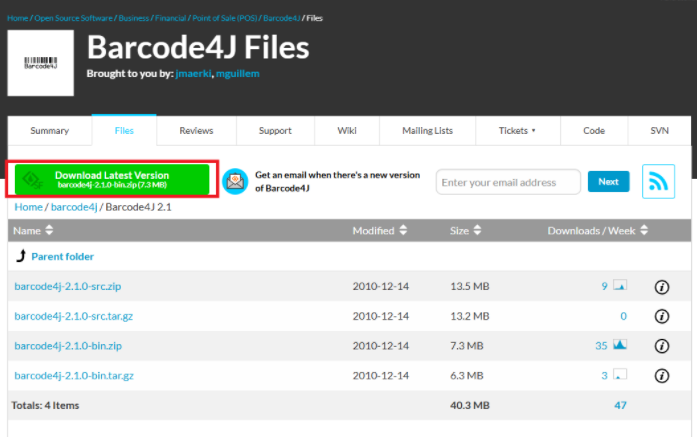


3. 다운로드 받은 barcode4j-2.1.jar 파일을 libs 폴더에 넣어준다.
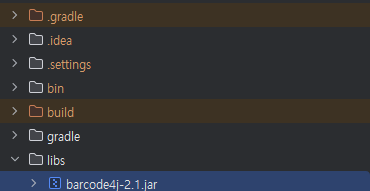
4. 이후 gradle.build에 가서 의존성을 추가해준다 jasper등 필요한 설정들을 넣어주자,.
    implementation 'net.sf.jasperreports:jasperreports:6.21.5'
    implementation 'net.sf.jasperreports:jasperreports-fonts:6.21.5'

    implementation files('libs/barcode4j-2.1.jar')
    implementation 'com.google.zxing:core:3.5.3'
    implementation 'com.google.zxing:javase:3.5.3'

    //implementation 'com.github.librepdf:openpdf:1.3.30'

    implementation 'org.apache.xmlgraphics:xmlgraphics-commons:2.9'
    implementation 'org.apache.xmlgraphics:batik-anim:1.17'
    implementation 'org.apache.xmlgraphics:batik-awt-util:1.17'
    implementation 'org.apache.xmlgraphics:batik-bridge:1.17'
    implementation 'org.apache.xmlgraphics:batik-css:1.17'
    implementation 'org.apache.xmlgraphics:batik-dom:1.17'
    implementation 'org.apache.xmlgraphics:batik-gvt:1.17'
    implementation 'org.apache.xmlgraphics:batik-parser:1.17'
    implementation 'org.apache.xmlgraphics:batik-svggen:1.17'
    implementation 'org.apache.xmlgraphics:batik-util:1.17'
    implementation 'org.apache.xmlgraphics:batik-transcoder:1.17'
    implementation 'org.apache.xmlgraphics:batik-codec:1.17'
5. 이후 resource 밑에 jasperreports.properties를 만든 이후 해당 하는 설정을 넣어주자.
- JasperReports 엔진에게 “qrcode 컴포넌트가 등장하면 이 클래스로 처리하라” 라고 알려주는 설정.

net.sf.jasperreports.components.registry.factory.qrcode=net.sf.jasperreports.components.barcode4j.QRCodeComponentFactory6. 이후 build clean -> build 후 재 실행을 한 뒤 출력 결과를 보자. QR코드가생성이됌.

반응형
'Report' 카테고리의 다른 글
| [Jaspersoft Studio] JAVA 한글 폰트 설정 -(8) (0) | 2025.10.21 |
|---|---|
| [Jaspersoft Studio] Jasper Report - React 연동 (6) (1) | 2025.08.25 |
| [Jaspersoft Studio] Jasper Report InteliJ 연동 Gradle (5) (2) | 2025.08.11 |
| [Jaspersoft Studio] jxrml 파일 생성 및 DB SELECT(4) (3) | 2025.08.11 |
| [Jaspersoft Studio] Data Adapters DBMS 연결 ClassNotFoundException 해결 (3) (4) | 2025.08.06 |


