반응형
FullCalendar 라이브러리를 사용해서 달력에 공휴일을 추가하고싶었는데
google이 아닌 누리집에 API를 사용해서 만들어보았다.
우선은 먼저 완성된 달력을 공유하겠다 .

1) https://www.data.go.kr/index.do 이후 로그인

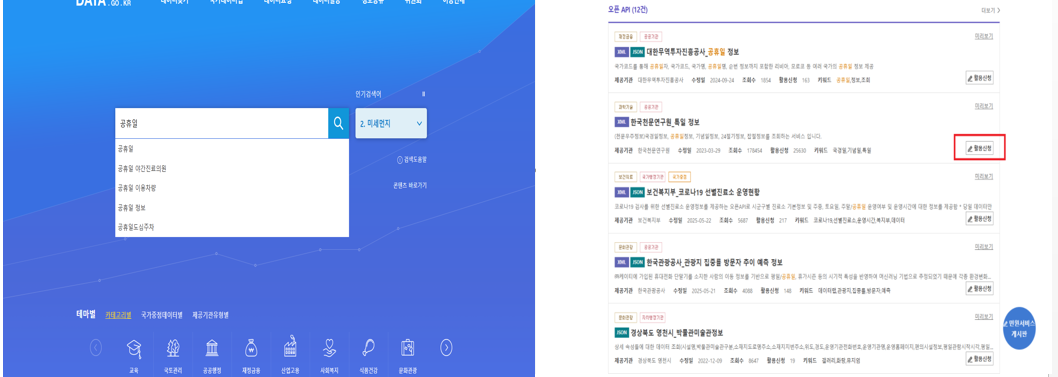
2) 공휴일 입력 -> 한국전문연구원_특일 정보 활용신청 클릭
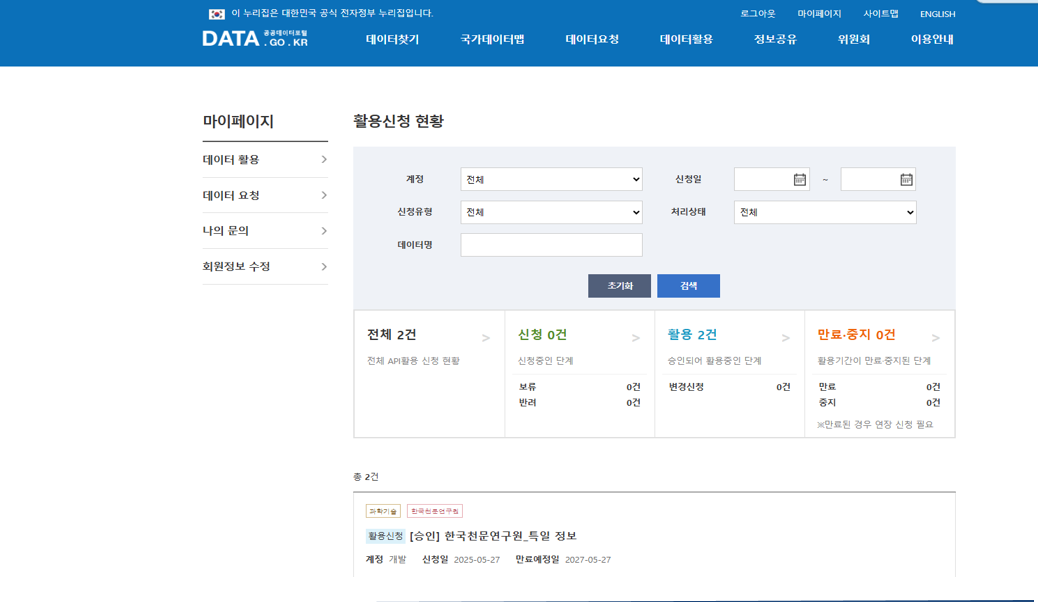
3) 활용신청 이후 -> 승인 확인
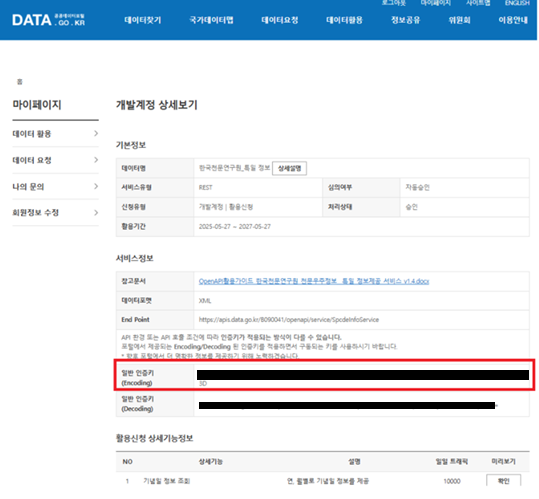
4) 일반 인증키 확인. (활용신청 상세기능정보 에서 테스트 가능)
5) env , env_developer, env_production(운영계정따로신청해야함) 서비스키 (일반 인증키) 입력

6) holidayApi.ts (공통 유틸) 함수 선언
// 한국천문연구원_특일 정보 (누리집 API )
export async function fetchKoreanHolidays(year: number, serviceKey: string) {
  const url = `https://apis.data.go.kr/B090041/openapi/service/SpcdeInfoService/getRestDeInfo?solYear=${year}&numOfRows=100&ServiceKey=${serviceKey}&_type=json`;
  const res = await fetch(url);
  const json = await res.json();
  const items = json.response.body.items.item || [];
  return (Array.isArray(items) ? items : [items]).map((item: any) => {
    // 날짜 문자열로 변환 (UTC 문제 방지)
    const y = String(item.locdate).slice(0, 4);
    const m = String(item.locdate).slice(4, 6);
    const d = String(item.locdate).slice(6, 8);
    return {
      date: `${y}-${m}-${d}`,
      name: item.dateName,
    };
  });
}
7) 컴포넌트 에 적용 소스 구현
import React, { useEffect, useRef, useState } from "react";
import FullCalendar from "@fullcalendar/react";
import dayGridPlugin from "@fullcalendar/daygrid";
import interactionPlugin from "@fullcalendar/interaction";
import timeGridPlugin from "@fullcalendar/timegrid";
import listPlugin from "@fullcalendar/list";
import bootstrapPlugin from "@fullcalendar/bootstrap";
import { EventInput } from "@fullcalendar/core";
import { fetchKoreanHolidays } from "../../../utils/holidaysApi";

// 서비스키를 환경변수로 관리 (REACT_APP_HOLIDAY_API_KEY)
const HOLIDAY_API_KEY = process.env.REACT_APP_HOLIDAY_API_KEY || "";

interface Props {
  onDateClick: (arg: any) => void;
  onEventClick: (arg: any) => void;
  onDrop: (arg: any) => void;
  onEventDrop: (arg: any) => void;
  events: EventInput[];
  currentFilter?: string;
  onFilterChange?: (newFilter: string) => void;
}

const testPlanCalendar: React.FC<Props> = ({
  onDateClick,
  onEventClick,
  onDrop,
  onEventDrop,
  events,
  currentFilter,
  onFilterChange,
}) => {
  const calendarRef = useRef<HTMLDivElement>(null);
  const [holidays, setHolidays] = useState<{ date: string; name: string }[]>([]);
  const [currentYear, setCurrentYear] = useState<number>(new Date().getFullYear());

  // 연도 변경될 때마다 공휴일 API 호출
  useEffect(() => {
    if (HOLIDAY_API_KEY && currentYear) {
      fetchKoreanHolidays(currentYear, HOLIDAY_API_KEY).then(setHolidays).catch(console.error);
    }
  }, [currentYear]);

  // 연/월이 바뀔 때마다 연도 추출
  const handleDatesSet = (info: any) => {
    const newYear = info.start.getFullYear();
    if (newYear !== currentYear) setCurrentYear(newYear);
  };

  useEffect(() => {
    if (!calendarRef.current) return;
    const mapping: Record<string, string> = {
      "11": "team",
      "22": "dept",
      "33": "division",
      "99": "all",
    };
    Object.entries(mapping).forEach(([value, id]) => {
      const btn = calendarRef.current!.querySelector<HTMLElement>(`.fc-button-${id}`);
      if (btn) btn.classList.toggle("fc-button-active", currentFilter === value);
    });
  }, [currentFilter]);

  return (
    <div id="calendar" ref={calendarRef}>
      <FullCalendar
        initialView="dayGridMonth"
        plugins={[dayGridPlugin, interactionPlugin, timeGridPlugin, listPlugin, bootstrapPlugin]}
        handleWindowResize
        themeSystem="bootstrap"
        editable
        selectable
        droppable
        events={events}
        dateClick={onDateClick}
        datesSet={handleDatesSet}
        eventClick={onEventClick}
        drop={onDrop}
        eventDrop={onEventDrop}
        customButtons={{
          team: { text: "test", click: () => onFilterChange?.("11") },
          dept: { text: "test1", click: () => onFilterChange?.("22") },
          division: { text: "test2", click: () => onFilterChange?.("33") },
          all: { text: "test3", click: () => onFilterChange?.("99") },
        }}
        headerToolbar={{
          left: "prev,next today team,dept,division,all",
          center: "title",
          right: "dayGridMonth,timeGridWeek,timeGridDay,listMonth",
        }}
        buttonText={{
          today: "Today",
          month: "Month",
          week: "Week",
          day: "Day",
          list: "List",
          prev: "Prev",
          next: "Next",
        }}
        //  셀에 공휴일 클래스/색상 추가
        dayCellClassNames={(arg) => {
          const day = arg.date.getDay();
          const y = arg.date.getFullYear();
          const m = String(arg.date.getMonth() + 1).padStart(2, "0");
          const d = String(arg.date.getDate()).padStart(2, "0");
          const dateStr = `${y}-${m}-${d}`;
          const holiday = holidays.find((h) => h.date === dateStr);
          if (holiday) return ["fc-holiday-cell"];
          if (day === 6) return ["fc-saturday"];
          if (day === 0) return ["fc-sunday"];
          return [];
        }}
        // 셀 아래에 공휴일 명칭 표시
        dayCellContent={(arg) => {
          const y = arg.date.getFullYear();
          const m = String(arg.date.getMonth() + 1).padStart(2, "0");
          const d = String(arg.date.getDate()).padStart(2, "0");
          const dateStr = `${y}-${m}-${d}`;
          const holiday = holidays.find((h) => h.date === dateStr);
          return (
            <div className="fc-daygrid-day-top-inner">
              <span className="fc-daygrid-day-number">{arg.dayNumberText}</span>
              {holiday && <span className="fc-holiday-name">{holiday.name}</span>}
            </div>
          );
        }}
      />
      {/* FullCalendar CSS 오버라이드: fc-holiday-cell 클래스 추가 */}
      <style>
        {`
          .fc-holiday-cell {
            background: #ffecec !important;
            color: #c00 !important;
            border-radius: 8px;
          }
        `}
      </style>
    </div>
  );
};

export default testPlanCalendar;
//style.scss

// 토요일 일요일 백그라운드
.fc-saturday, .fc-sunday {
  background-color: #f8f9fa !important;
}

.fc-saturday, .fc-sunday {
  background-color: #f8f9fa !important;
}
css에 내용은 너무 길다보니 ,, 약식으로 남기겠습니다.,.
반응형
'JavaScript > React' 카테고리의 다른 글
| [React] TypeScript Alias 설정 import ../../../redux -> @redux로 변경 (0) | 2025.11.19 |
|---|---|
| [React] 이미지 미리보기 C: 경로에 있는 파일 불러오기 (0) | 2025.07.04 |
| [React] Input Onchange 이벤트 버벅임 해결 (0) | 2025.05.20 |
| [React] React Hooks이란 ? (0) | 2024.11.27 |

