반응형
Contoller에서 파일 삭제를 간단하게 구현해봤다. 아주쉽다.
SpringBoot + Swagger(테스트)
우선은 file-upload-dir 이라고 Application.yml에 선언을 해줬따 . 경로를 지정해주는 것이다
#파일 저장 위치
file.upload-dir=C:/upload/
이후 컨트롤러에서 @Value 를 선언해줬다.
@Value("${file.upload-dir}")
private String uploadDir;
@Operation(summary = "파일 다운로드 API", description = "파일 다운로드")
@GetMapping("/downloadFile/{fileName:.+}")
public ResponseEntity<Resource> downloadByPath(@PathVariable String fileName) throws IOException {
    Path path = Paths.get(uploadDir).resolve(fileName);
    Resource resource = new UrlResource(path.toUri());

    if (!resource.exists()) {
        throw new FileNotFoundException("파일이 존재하지 않습니다.");
    }

    String encodedFileName = URLEncoder.encode(fileName, StandardCharsets.UTF_8).replaceAll("\\+", "%20");

    return ResponseEntity.ok()
            .header(HttpHeaders.CONTENT_DISPOSITION, "attachment; filename*=UTF-8''" + encodedFileName)
            .body(resource);
}
@Operation은 Swagger용 설명 어노테이션 → API 문서에 깔끔하게 표시됨
@GetMapping("/downloadFile/{fileName:.+}")에서 .+를 붙인 건 파일 확장자까지 포함되도록 하기 위함
- Paths.get(uploadDir) → 업로드 디렉토리 (uploadDir)의 Path 객체 생성
- .resolve(fileName) → 파일명을 경로에 붙임 (경로 조합)
- UrlResource로 해당 경로의 파일을 리소스로 변환
- URLEncoder.encode()로 UTF-8로 인코딩
- 브라우저에서 +는 공백으로 처리되므로 %20으로 치환
- Content-Disposition: attachment; filename*=UTF-8''...
→ 다운로드 강제 및 인코딩된 파일명 설정 (RFC 5987 표준) - .body(resource) → 실제 파일 전송
프론트 소스도 보겠다.
/* 파일 다운로드 API */
export const downloadSalesActivityFile = createAsyncThunk<AxiosResponse<Blob>, string>(
  "downloadFile",
  async (fileName, thunkAPI) => {
    const { rejectWithValue } = thunkAPI;
    try {
      const encodedFileName = encodeURIComponent(fileName);
      const res = await axios.get(`/downloadFile/${encodedFileName}`, {
        responseType: "blob",
      });
      return res;
    } catch (err) {
      return rejectWithValue((err as AxiosError).response?.data);
    }
  }
);
선언을 한 이후 이벤트가 발생할떄 호출을 하게된다 .
const handleFileDownload = async (fileName: string) => {
  try {
    const res = await dispatch(downloadSalesActivityFile(fileName)).unwrap();
    const url = window.URL.createObjectURL(res.data);
    const link = document.createElement("a");
    link.href = url;
    link.setAttribute("download", fileName);
    document.body.appendChild(link);
    link.click();
    link.remove();
  } catch (err) {
    console.error("파일 다운로드 실패", err);
    alert("파일 다운로드 중 오류가 발생했습니다.");
  }
};


/* 이 부분에 Props로 내려준다. (React) 사용중.*/
<FileUploader
  onFileUpload={handleFileUpload}
  onFileRemove={handleFileRemove}
  onFileDownload={handleFileDownload}
  isDisabled={isDisabled}
  initialFiles={
    salesActivitySaveReq?.saveActivityFileList?.map((f) => ({
      name: f.nmFile,
    })) || []
  }
/>
이후 클릭 이벤트가 발생할떄 API가 호출이된다.
<Col style={{ paddingLeft: 5, flex: 1, overflow: "hidden" }}>
  <a
    href="#"
    onClick={(e) => {
      e.preventDefault();
      onFileDownload?.(f.name);
    }}
    download={f.name}
    style={{
      display: "block",
      fontSize: 12,
      fontWeight: "bold",
      color: "#555",
      textDecoration: "none",
      whiteSpace: "nowrap",
      overflow: "hidden",
      textOverflow: "ellipsis",
    }}
  >
    {f.name}
  </a>
  <p style={{ margin: "2px 0 0", fontSize: 10, color: "#999" }}>{f.formattedSize}</p>
</Col>
짜짠 쉽다.
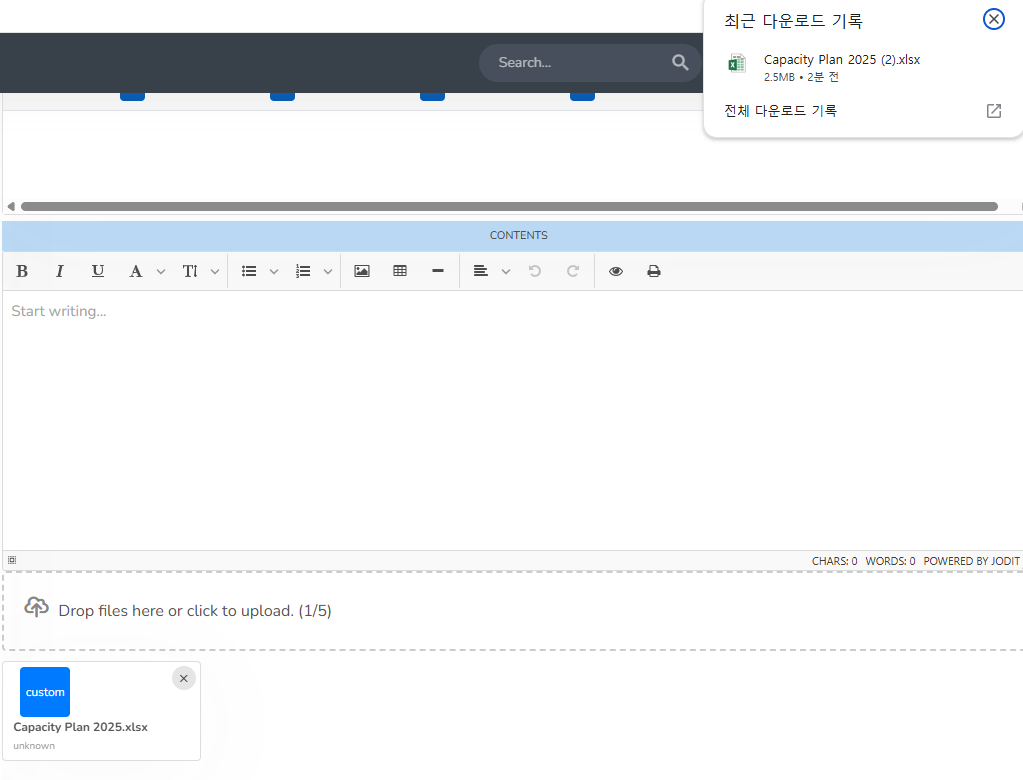
해당 소스에서 보안 및 여러 로직들이 포함되어있지만 바로 따라 쓸 수 있게 간단하게 정리를 해봤다.
++ 다운로드를 받을려면 당연히 해당 폴더에 다운로드 받을 파일이 존재해야합니다.
[JAVA] 파일 업로드 간단하게 구현
Controller에서 Excel Upload를 간단하게 구현해보았다. 아주쉽다. SpringBoot + Swagger(테스트) 우선은 file-upload-dir 이라고 Application.yml에 선언을 해줬따 . 경로를 지정해주는 것이다. #파일 저장 위치file.uplo
ycds.tistory.com
[JAVA] 파일 삭제 간단하게 구현
Contoller에서 파일 삭제를 간단하게 구현해봤다. 아주쉽다. SpringBoot + Swagger(테스트) 우선은 file-upload-dir 이라고 Application.yml에 선언을 해줬따 . 경로를 지정해주는 것이다#파일 저장 위치file.upload-di
ycds.tistory.com
반응형
'JAVA' 카테고리의 다른 글
| [Java] 이미지 미리보기 C: 경로에 있는 파일 불러오기 (1) | 2025.07.04 |
|---|---|
| [JAVA] application.properties에서 log 설정 (1) | 2025.05.27 |
| [JAVA] 파일 삭제 간단하게 구현 (0) | 2025.04.21 |
| [JAVA] 파일 업로드 간단하게 구현 (0) | 2025.04.21 |
| [JAVA] InetAddress Class를 사용하여 로컬 머신의 IP 주소와 호스트 이름 가져오기 (0) | 2024.07.18 |


